Simple Mode
Simple Mode is the easier way to use Kiwisynth. It hides the knobs and the synth terms, and lets you shape a sound by feel. It is a good place to start if you are new, and a fast place to work even if you are not. Anything you make here can be opened later in the full editor.
It has two pages. Sound is what the note is made of. Motion is everything that changes while the note sounds.
The Sound page
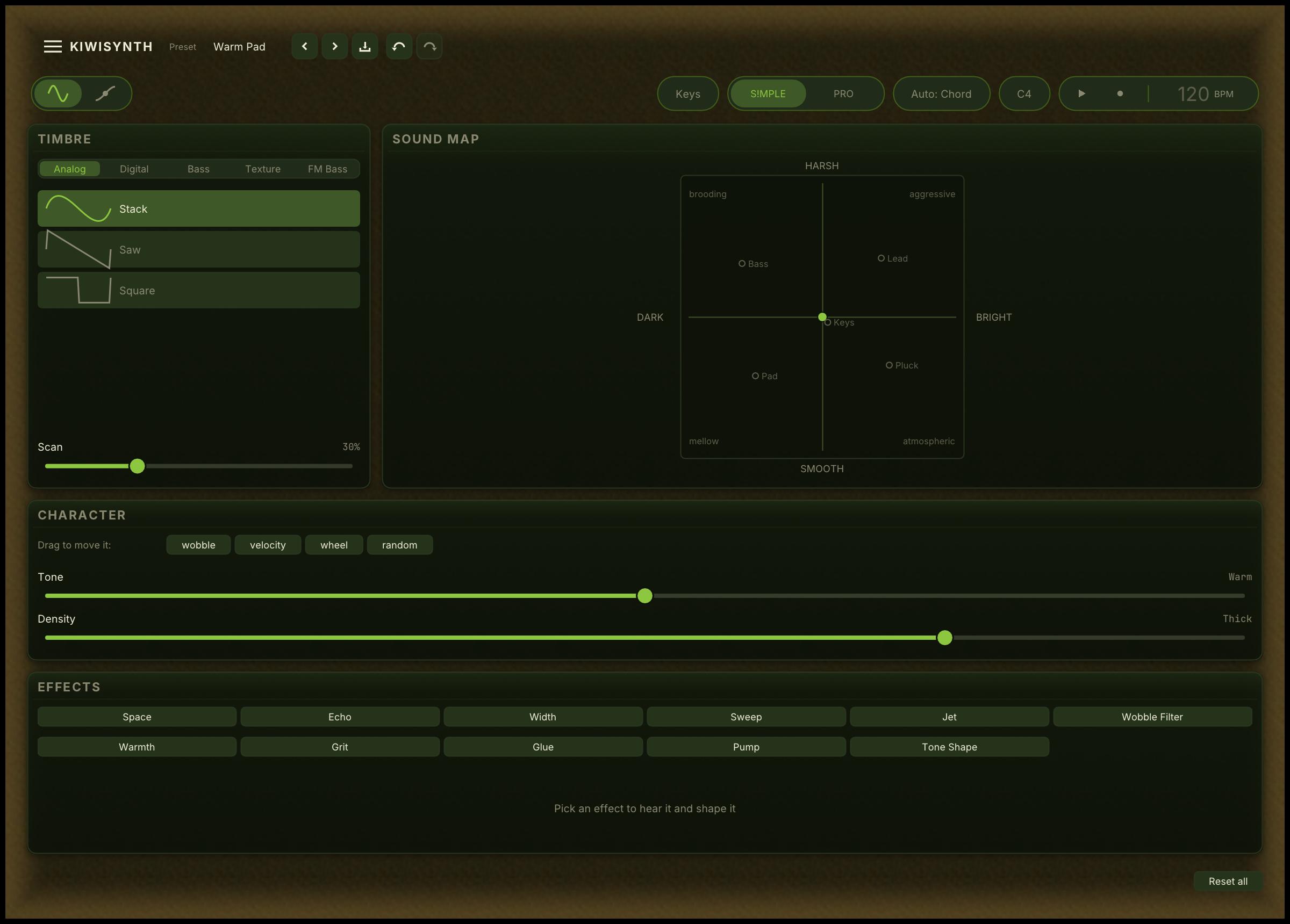
The Timbre Library
A short list of starting tones, grouped into families, each shown with a small picture of its shape. Pick one to give the patch its basic character, then shape it with everything below.
Under the list is the shape strip. Some tones are built from a row of shapes rather than one, and the strip shows them. Drag across it to move between them and the tone changes as you go, from rounded at one end to bright and edged at the other. Tones built from a single shape say so instead, and the strip does nothing, so a control that cannot change the sound never invites you to try.
The Sound Map
A single pad you drag around. Left and right takes the sound from dark to bright. Up and down takes it from smooth to harsh. Marks on the pad show roughly where bass, lead, pad, keys and pluck sounds tend to sit, as a guide.
The pad moves the sound relative to the Tone slider rather than overriding it. Set Tone to Dark and the whole pad stays dark: you are steering within the character you chose, not fighting it.
Tone and Density
Two sliders that run continuously between named positions. Tone runs Glass, Clear, Warm, Dark, Murky. Density runs Mono, Thin, Warm, Thick, Wall.
The names are marked along the slider and the current one is shown at the end. Park the slider between two of them and the name dims, because you are between two named things rather than at one. Double-click to snap to the nearest name when you want a setting you can return to exactly.
Effects
Every effect Kiwisynth has, under a plain name: Space, Echo, Width, Sweep, Jet, Wobble Filter, Warmth, Grit, Glue, Pump and Tone Shape.
Click one to switch it on. Click it again to select it without switching it off, and click the selected one to switch it off. The selected effect shows two controls: how much of it you hear, and its character, which runs between named positions the same way Tone does. Space runs Booth, Room, Hall, Cathedral, Endless.
The Motion page
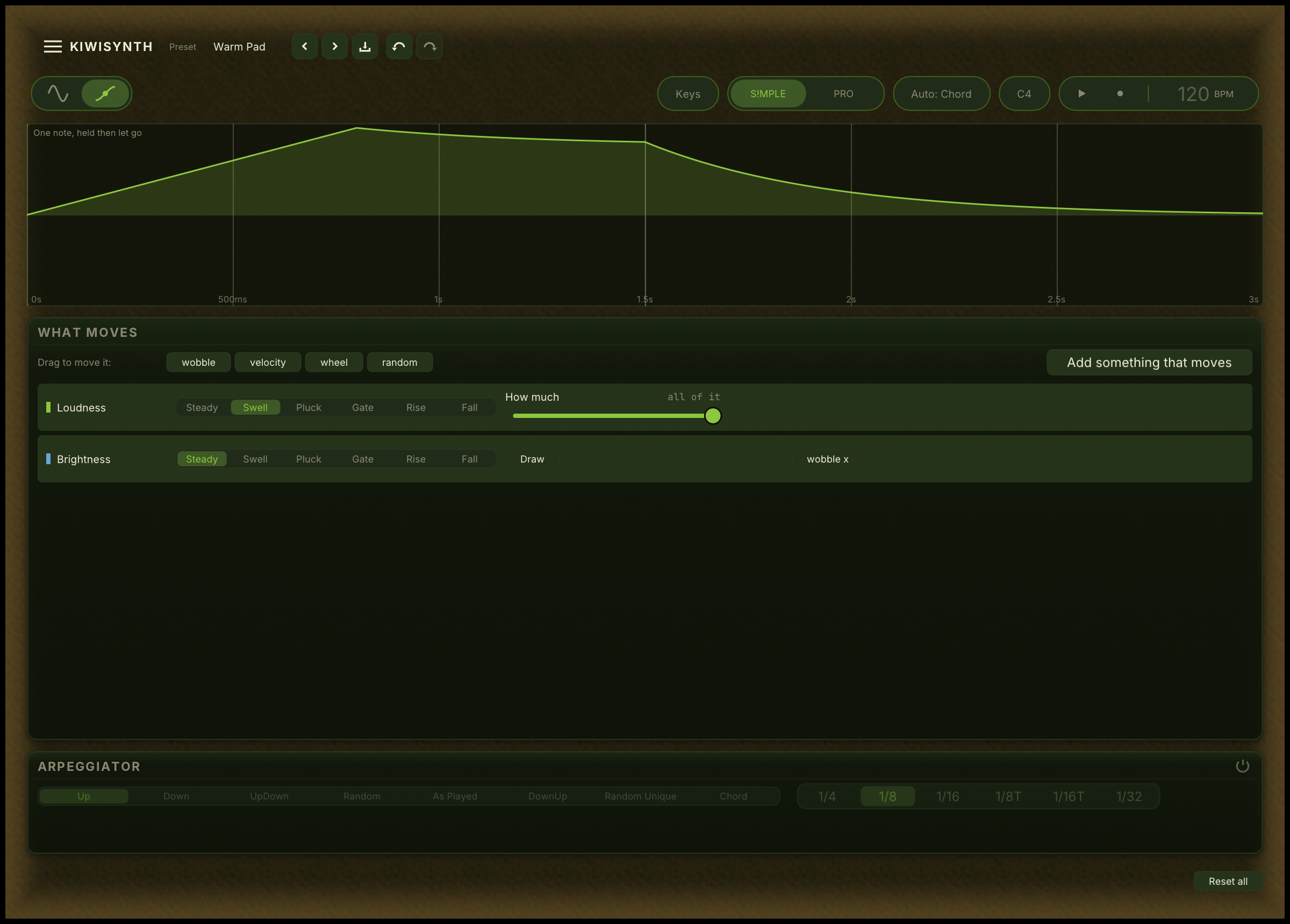
The picture
One note, drawn left to right. Each thing that moves gets its own row, and the vertical line marks where you let go of the key. This is the page's whole argument: you can see when the sound gets louder relative to when it gets brighter, instead of inferring it from numbers.
Lanes
Each row is one thing that moves, and reads as a sentence: what moves, what its own movement looks like over the note, how much, and then anything else driving it.
Loudness and Brightness are always there. Add more with the button, or by dragging a chip onto a control.
The shape is picked by name:
- Steady, no movement of its own.
- Swell, grows into the note.
- Pluck, starts loud and falls away.
- Gate, full while the key is down.
- Rise, climbs across the note and stays.
Click the small picture beside the shape to draw the curve yourself. The named shapes are still there along the bottom of the drawing pad, so drawing is never a decision you cannot undo.
Drag a chip onto a control
Four chips sit above the controls on both pages: wobble, velocity, wheel and random. Drag one onto a control and that control starts following it.
They are the things that are not the note itself, which is why there is no "swell" chip: a swell is a shape, and every lane already has one. Drop a chip on the Sound page and the Motion page flashes to say a lane appeared there. You are not moved to the other page, so you can keep working.
A control that will not take a chip shows nothing when you drag over it. An effect's character slider is one: it chooses between named settings, and a halfway point between two of them is not a setting.
Once every wobble is in use, a new one shares an existing movement rather than inventing a fifth. Those chips are drawn with a dashed edge, so a shared movement is visible rather than a surprise.
Saving
Save from the Menu button, the same as in the full editor. The preset browser in Simple Mode shows the sounds that were made here.
The same instrument
Simple Mode is not a cut-down version of Kiwisynth. It plays through the same engine and the same effects. A sound made here can be opened in the full editor at any time, where every choice you made appears as ordinary controls: a shape on a lane is the amp envelope or a drawn motion contour, and a chip is a modulation routing. Nothing is hidden from you later, and nothing is lost when you switch.