Envelopes and MSEG
This page covers the amp envelope, the two modulation envelopes, and the MSEG generators.
The amp envelope always shapes loudness. The two modulation envelopes are free for you to point anywhere, from the Modulation page. That is the only difference between them: all three have the same stages, the same curve controls and the same editor.
Envelopes
An envelope makes a one-shot movement that follows each note. It begins when the key is pressed and ends after the key is released.
A common use for a modulation envelope is to point it at the filter cutoff, so the tone has its own shape in time, different from the loudness shape.
The envelope editor has a tab for each one: A for the amp envelope, E1 and E2 for the two modulation envelopes. The amp envelope also keeps its four knobs in the Amp section, which is quicker when you only want to shorten a release. Both places drive the same controls, so they always agree.
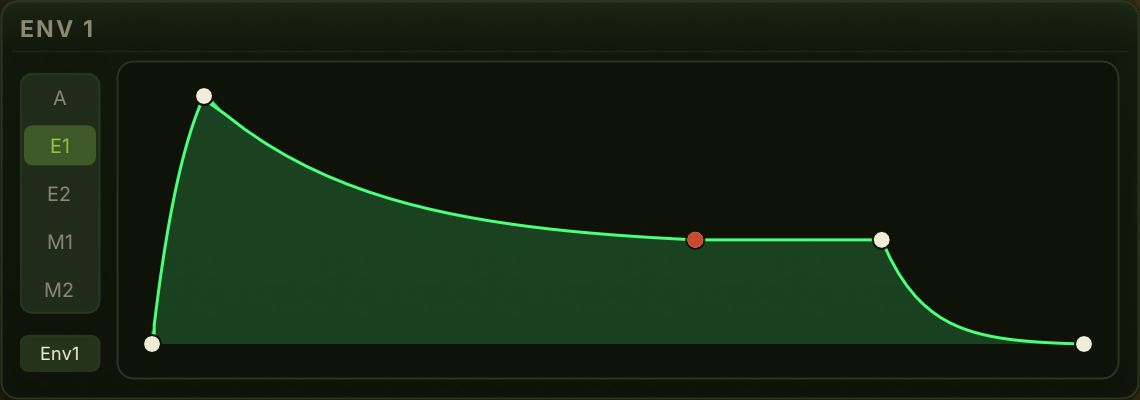
The stages
Six, in the order they run.
Delay. How long the envelope waits after the key is pressed before anything happens. At 0, the default, the attack starts at once. Give it a time and the note arrives late, which is how you build a layer that comes in behind the others.
Attack. How long the envelope takes to rise to its peak.
Hold. How long it stays at the peak before the decay begins. At 0, the default, the decay follows the attack directly. Give it a time and a bright attack keeps its edge for a moment before it falls away.
Decay. How long it takes to fall from the peak down to the sustain level.
Sustain. The level the envelope holds at while the key is down.
Release. How long it takes to fall back to nothing after the key is released.
Shaping it
Drag the points to move them. Six points sit along the curve, one for the end of each timed stage plus one for the sustain level. Delay and Hold show as small dim dots until you give them a time.
Drag the line between two points to bend it. This is the same gesture the MSEG editor uses. Three of the segments can be bent: the rise, the fall to sustain, and the fall after release.
The centre position is the synth's natural shape: a straight rise, and a fall that drops fast and eases out. Bend the rise upward and it moves quickly at first and eases into the peak, which is closer to how an acoustic note starts. Bend a fall the other way and it becomes a straight line.
MSEG
MSEG stands for multi-segment envelope generator. Where an ordinary envelope has four fixed stages, an MSEG is a contour you draw yourself, with as many points as you like. It can rise and fall several times, hold, and loop.
Use an MSEG when you want movement with a specific shape that an ordinary envelope or an LFO cannot give, such as a rhythmic pattern or a complex swell.
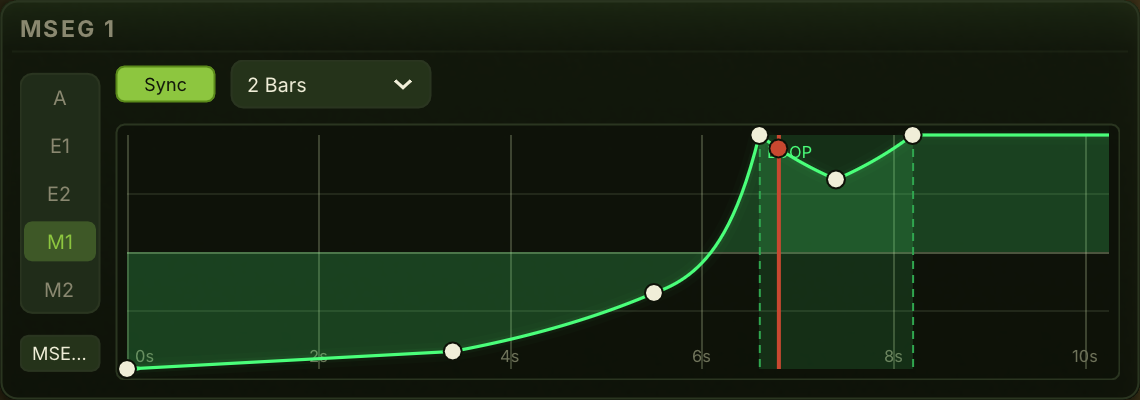
Kiwisynth has two MSEGs. You draw each one in the editor: drag points to move them, bend the segments between them, and add or remove points. You can mark a point where the contour holds while the key is down, and a section that loops.
Rate. Sets how fast the drawn contour plays back. A higher rate runs the shape faster. Drag the chip up or down to change it.
Sync. Next to the Rate chip is a Free / Sync switch. Free plays the contour back at the Rate you set, in the seconds you drew it in.
Sync stretches the whole contour to a musical length instead, and the chip beside it becomes a note division. A contour set to 1 Bar takes exactly one bar, whatever the tempo, and follows the tempo if it changes. Beat lines appear across the contour so you can see where the beats fall while you draw. The Rate control is ignored while Sync is on.
Use Sync for a rhythmic shape that has to line up with the track. A drawn contour that repeats on a loop and locks to the grid is the thing an ordinary LFO shape cannot give you.
One difference from a synced LFO is worth knowing. A synced MSEG still starts at the beginning of its contour on each note, rather than jumping to wherever the bar currently is. An MSEG has an attack to it, and starting part-way in would skip the attack of any note you did not play exactly on a bar line. If you want a shape that is locked to the bar rather than to the note, use a Global LFO with Sync and a custom shape.