Filter & Amp
This page does two jobs. The filter shapes the tone of the sound. The amp envelope shapes its loudness over time, from the moment a key is pressed to after it is released.
What a filter does
A filter removes part of the sound. The most common kind, a low-pass filter, removes the high frequencies and lets the low ones through, which makes the sound darker and softer. Given movement, the filter is what makes a sound open up or close down as it plays.
Kiwisynth gives every voice two filters, Filter 1 and Filter 2. Filter 2's Type is Off until you pick one, and its other knobs are greyed out until then.
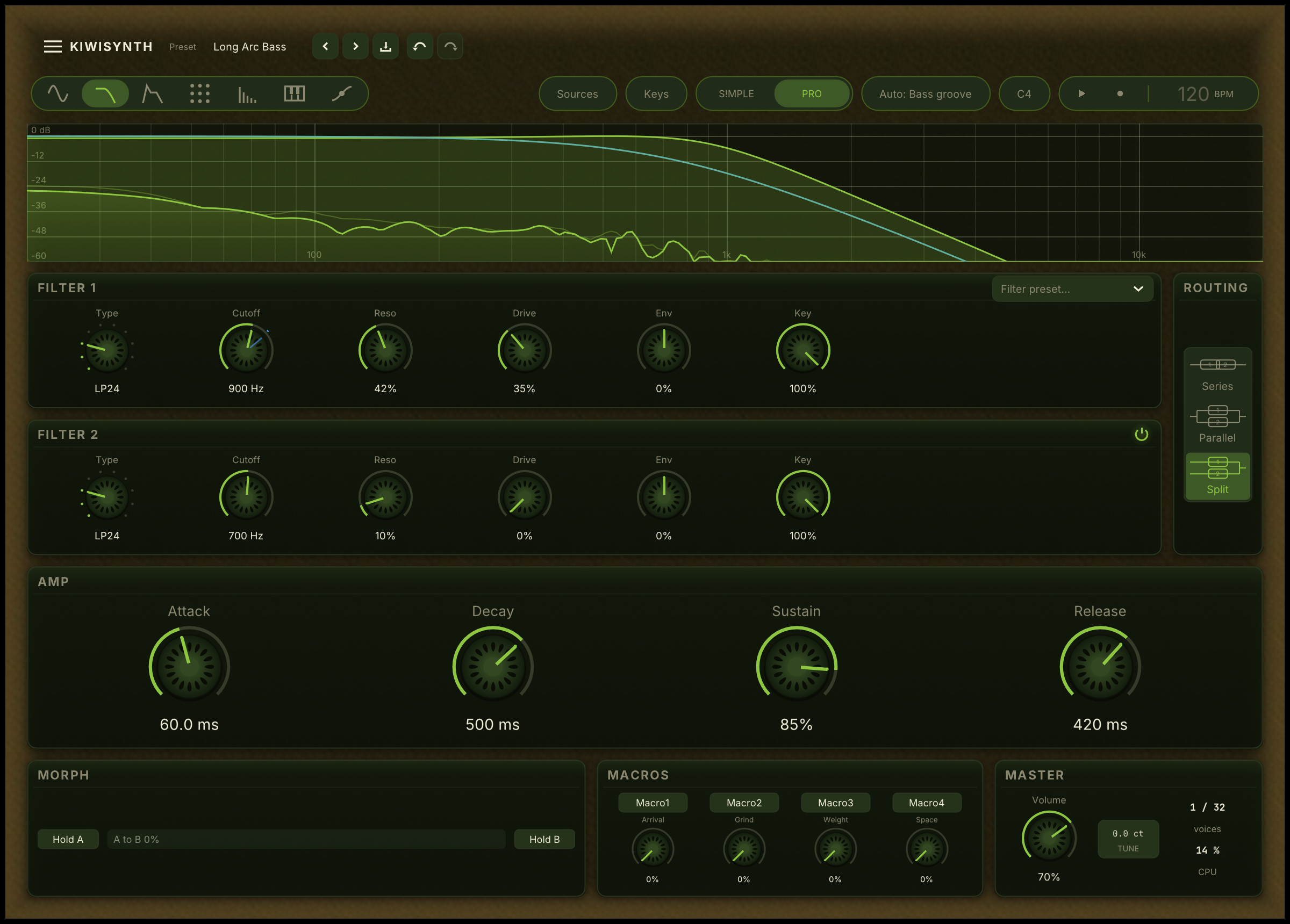
Filter controls
Both filters have the same controls.
Filter preset... In the Filter 1 card. Loads a section preset: a ready-made setting for both filters, without changing the rest of the sound.
The power button. In the corner of each filter's header. It switches that filter out of the signal path and keeps every setting it has, so you can hear the sound with and without it and go back. Its response curve disappears while it is off, which is how you can tell at a glance that a quiet filter is switched out rather than set wrong. Setting Type to Off silences the filter too, but it forgets which type you had chosen.
Type. The kind of filtering. Off passes the sound through untouched. The low-pass types, marked LP, remove highs and darken the sound. The high-pass types, marked HP, remove lows and thin it. The numbers 12 and 24 say how sharply the filter cuts; 24 is the stronger version. Band-pass, BP, keeps only a band in the middle. Notch removes a narrow band. Comb adds a metallic, resonant colour. Formant makes the sound speak in vowels.
MGLow24 is a second 24 dB low-pass with a different character. Where LP24 is clean and surgical, MGLow24 has the warm, slightly woolly tone of the classic ladder-style filter used in many vintage analogue synths. Two things set it apart. As resonance rises it loses some of the bass, the signature trait of this design and the reason people reach for it. And pushed to the top, the filter rings into a clean sine at the cutoff frequency, useful as a playable tone in its own right.
Cutoff. The frequency where the filter acts. On a low-pass filter, a low cutoff sounds dark and muffled, a high cutoff sounds bright and open. This is the filter's main control, and a rewarding one to add movement to.
Reso. Resonance. This emphasises the sound right at the cutoff frequency, adding a sharp, whistling peak. A little adds character. Pushed far, the filter begins to ring and sing on its own.
Drive. Adds saturation inside the filter, a warmth that grows as you push it. It makes a resonant filter sound fuller and less harsh.
Env. How much the amp envelope, described below, opens or closes the cutoff. Turned one way the filter opens at the start of each note and closes as the note fades, the classic way to make a sound that is bright on attack and darkens as it holds. Turned the other way it does the reverse. At the centre the envelope does not touch the cutoff.
Key. Key track: how far the cutoff follows the note you play. The Cutoff knob sets the frequency at middle C. At 100%, the default, every octave you play moves the cutoff an octave, so high and low notes are filtered alike. At 0% the cutoff stays at one frequency on every key, the way the wooden body of a violin or cello resonates at the same pitches whatever note is bowed through it. In between, the cutoff follows part of the way: at 50%, playing two octaves up opens it one octave. Not shown for Formant, whose vowel peaks never follow the cutoff.
Vowel. Shown only when Type is Formant. It morphs the sound through the vowels, from a dark "oo" to a bright "ee". The vowel peaks sit at the same frequencies on every key, so a Formant filter also works as a fixed body resonance.
The comb as a struck tube
When Type is set to Comb, the filter resonates like a pipe tuned to the note you play. On its own it adds a hollow, metallic colour. Two extra controls turn it into a model of a struck tube, the sound of a length of pipe hit at one end. They are shown only for Comb.
Mode. Open or Closed. Open resonates on the full harmonic series, the bright ring of a tube open at both ends. Closed keeps only the odd harmonics, the hollower, darker voice of a tube stopped at one end and struck at the open end. Closed is the more pipe-like of the two. The played note stays the same pitch in both modes.
Damp. How fast the resonance loses its highs as it rings. Turned down, the tube rings bright and long. Turned up, the upper partials fade quickly and the tail darkens and shortens, the way a real pipe settles toward its fundamental. Higher notes ring shorter than low ones on their own, because a shorter pipe sheds its energy faster.
To play the comb as a struck instrument rather than a filter colour, feed it a short burst instead of a held tone: a fast attack, no sustain, and the noise generator or the Pick Attack transient as the strike. Tuning the comb's cutoff to the played pitch lets the tube track the keyboard. At Key 0% the tube keeps one pitch on every key instead. The factory preset Pipe Striker is built this way, with one knob morphing it from a paddle-struck melodic pipe to a sharper, drier stick-struck knock.
Two filters together
The Routing card beside the filters sets how the pair works together. Each choice is drawn as a small picture of the signal path.
- Series. The sound passes through the first filter, then the second. Use it for a stronger, steeper effect.
- Parallel. Both filters work on the sound separately and the results are added. Use it to keep two different filter colours at once.
- Split. The first oscillator and the noise go through one filter, the second oscillator and the sub through the other. Use it to give two layers of one patch their own tone.
The response curve
Across the top of the page is a curve that draws the shape of the filters as you set them, from the lowest audible frequency on the left to the highest on the right. In Series and Parallel it shows the two filters' combined effect; in Split each filter gets its own curve, the second in another colour. When only Filter 1 is on, a dashed curve shows where Env sweeps the cutoff. Under the curves, the spectrum of what is playing moves in real time, so you can see what the filter is doing to the sound you hear.
The amp envelope
The Amp card holds the amp envelope.
An envelope describes how something changes over the life of a note. The amp envelope describes loudness, and every note you play follows it.
It has four stages, the classic ADSR.
Attack. How long the note takes to reach full volume after the key is pressed. A short attack is sharp and immediate. A long attack fades the sound in gently, as for a pad.
Decay. After the attack peak, how long the note takes to fall to the sustain level.
Sustain. The volume the note holds at while you keep the key down. Unlike the others this is a level, not a length of time. Set it low for a sound that fades away even while held, like a pluck. Set it high for a sound that holds steady, like an organ.
Release. After you let the key go, how long the note takes to fade to silence. A short release stops the note quickly. A long release lets it ring on.
Filter and distortion order
The per-voice distortion can run before or after the filter. The control for this sits with the distortion on the Effects page, and is described there.