Early Preview · Kiwisonic, Kiwisynth, Kiwipulse and Kiwibass are free during early preview. Their shape is still being figured out, and feedback is what drives them forward.

Design the phrase, not the note

A monophonic bass instrument. You draw how the sound moves across up to sixteen bars, a wander keeps each pass from repeating the last, and the same bar still bounces the way you heard it. Underneath sits a clean mono sub that no setting can widen or distort. Standalone editor for Windows, CLAP plugin for Windows and Linux.

Eight bars that read as a phrase, not a loop

A two-note bassline sounds looped because every bar is the same. The Arc tab is one canvas for the whole phrase: a lane each for Shape, Tone, Drive, Motion and Spread, drawn across 1 to 16 bars and locked to the transport. A wander rides on the drawing so no pass repeats the one before, yet it follows song position, so the same bar plays the same way on every playback and a bounce matches what you heard.

  • The canvas draws this pass and the next one side by side, so you see where the wander is taking the sound before you hear it
  • Drift sets how much wander rides on the drawing: down, the phrase plays exactly what you drew; up, the wander takes over
  • Amount scales the whole phrase, Depth each lane. A lane's line is drawn as thick as its depth, so the balance reads off the picture
  • Clear, Rise and Swell start a lane from a ramp or a rise-and-fall. Draw behind the playhead and the bar replays so you hear the change at once
  • Drawn in the standalone, saved with the patch, and played by the plugin once your host loads that patch
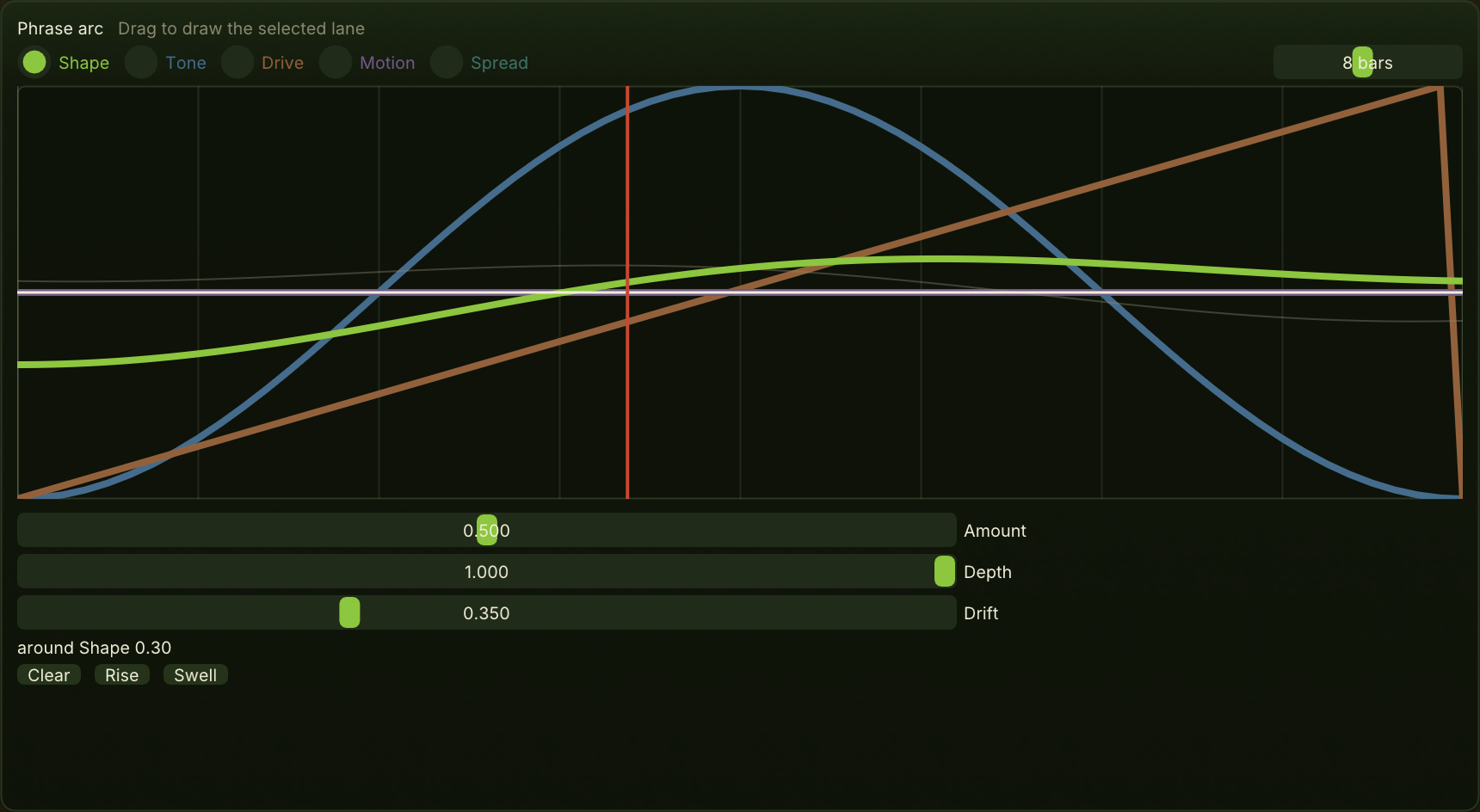
The Arc canvas over eight bars: Tone drawn as a swell, Drive as a rise, and the wander drifting both away from the drawing

The spectrum is the editor

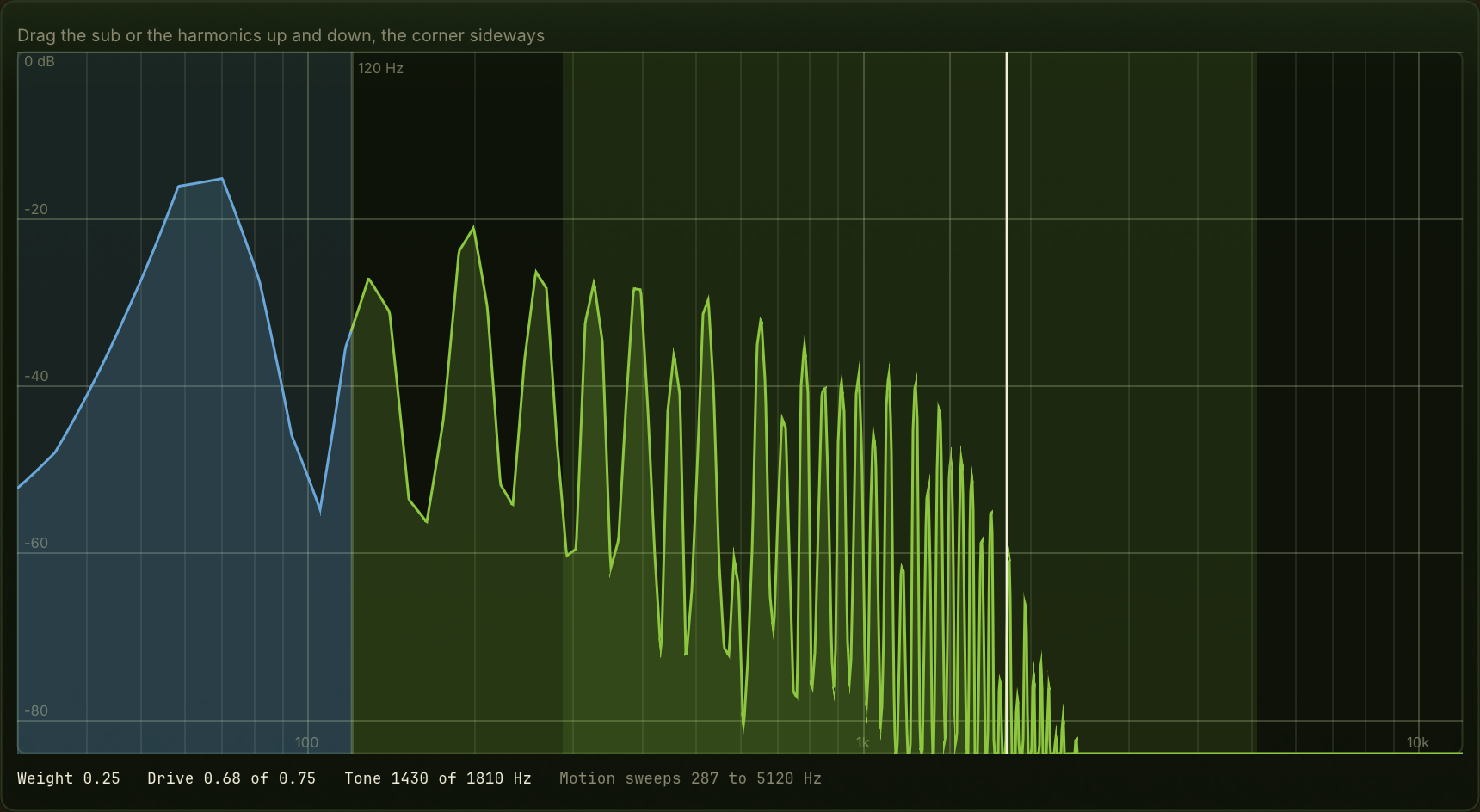
You set a bass's balance by looking at it. The Spectrum tab measures the engine at the note you are playing and shows the sub against the harmonics above it, with the crossover standing as a wall between them. Drag the sub up or down and you set Weight, drag the harmonics and you set Drive, drag the filter corner sideways and you set Tone.

  • Log frequency and log level, so the octave the sub lives in gets as much room as the octaves above it
  • Drive changes timbre, not loudness: close to a plain tone turned down, a changed character past a point turned up
  • The sweep band shows how far Motion carries the corner, and a thin line shows where the phrase has it right now
  • The trace is measured again whenever anything it depends on moves, the arc included
The Spectrum canvas: the sub left of the 120 Hz crossover, the harmonics above it, and the filter corner as a vertical handle

You cannot break your low end

The sub is a mono sine by construction. Width and drive exist only above the crossover, and no control turns that off, so a patch cannot phase-cancel its own bass. Other instruments offer a mono-bass option you have to remember to enable. Here there is nothing to enable.

  • Spread detunes and widens the layer above the sub only. At zero the output is exactly mono
  • Drive and Tone shape the harmonic layer; the sub underneath stays clean
  • Pluck decays the layer above while the sub keeps sounding, so a note starts bright and settles into a clean low end
  • The cost is deliberate: if you want a wide sub, this is not the instrument for it
The Voice panel: pictures for Punch, Shape, Glide with the Legato switch, and Spread with the sub standing in the middle

The line is written against the kick you draw

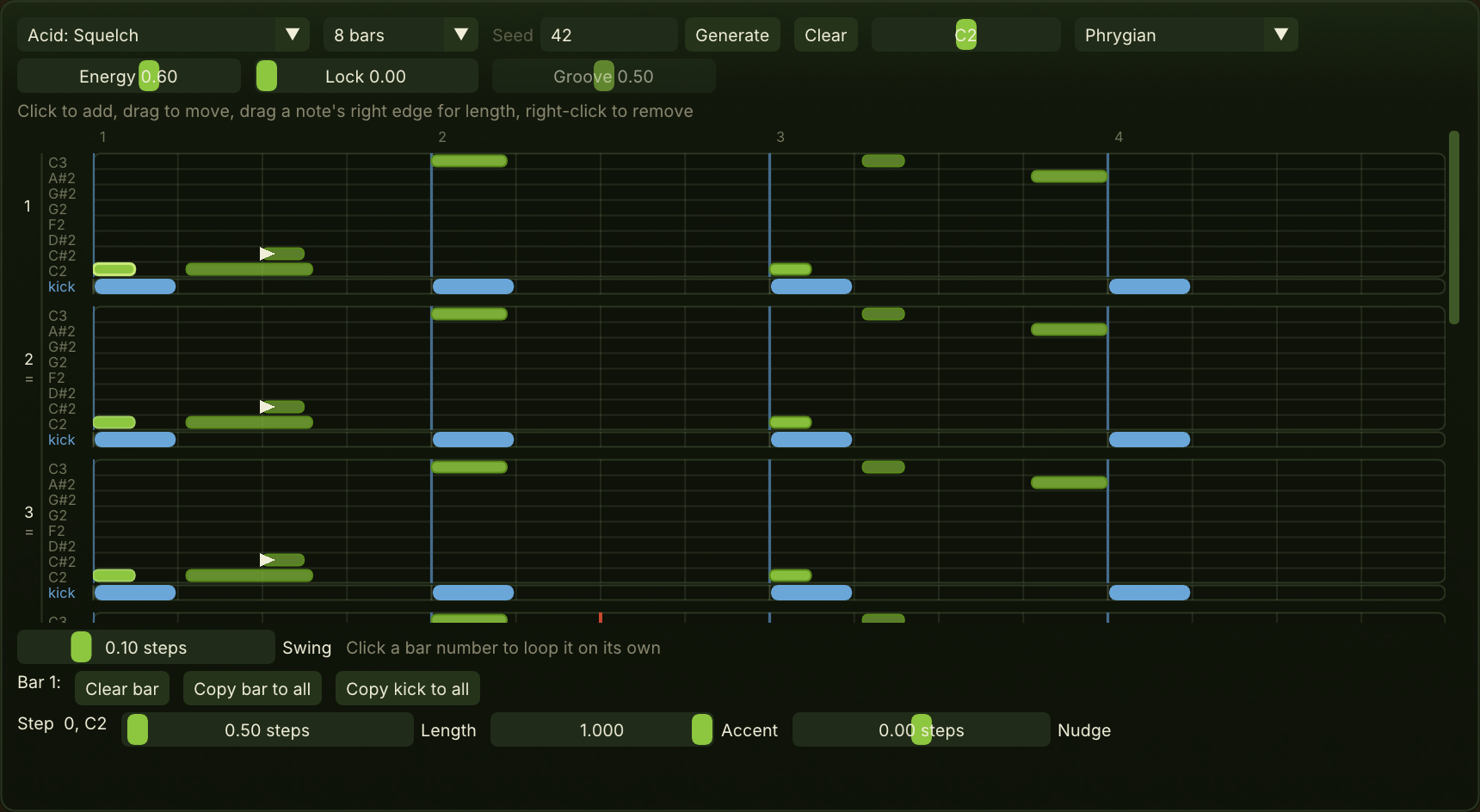
A bassline is only right against its kick. The Pattern tab draws each bar of bass above a kick row, and Generate writes the line against that kick: Lock sets how firmly it holds to it, Groove whether it sits on the kick or on its offbeat, Energy how much it plays. Every pitch lands in the scale you chose.

  • Line presets across House, Techno, Acid, Trance, DnB and Dubstep, at 4, 8 or 16 bars: three bars and an answer, then the figure restated changed
  • Scales: Minor, Major, Minor pentatonic, Dorian, Phrygian and Chromatic. Changing one loses nothing already written
  • Edit by hand: add, move, lengthen and remove notes, set accent, nudge a note off the grid, swing the offbeat sixteenths
  • Overlapping notes glide, so a slide is written as an overlap and travels as one
  • Export MIDI keeps timing, swing, nudges, accents as velocity and overlaps, ready for the plugin's track in your host. The kick is a reference and is not exported
The Pattern tab: line preset, length, seed, key and scale along the top, then one row per bar above a kick row

A line can be shared as a number

The generator follows genre rules from a seed, so the same seed, with the same line preset, settings, key and kick, always writes the same line. Write the number down and the line comes back; send it to someone and they get it too. A line you have edited by hand after generating is your own, and no longer its seed.

Every macro position sounds usable

No position of any macro is silent, clipping or off-level, and the test suite holds it to that. Turn anything anywhere and you get a sound worth judging. It is a promise about levels, not about taste.

Movement inside the beat

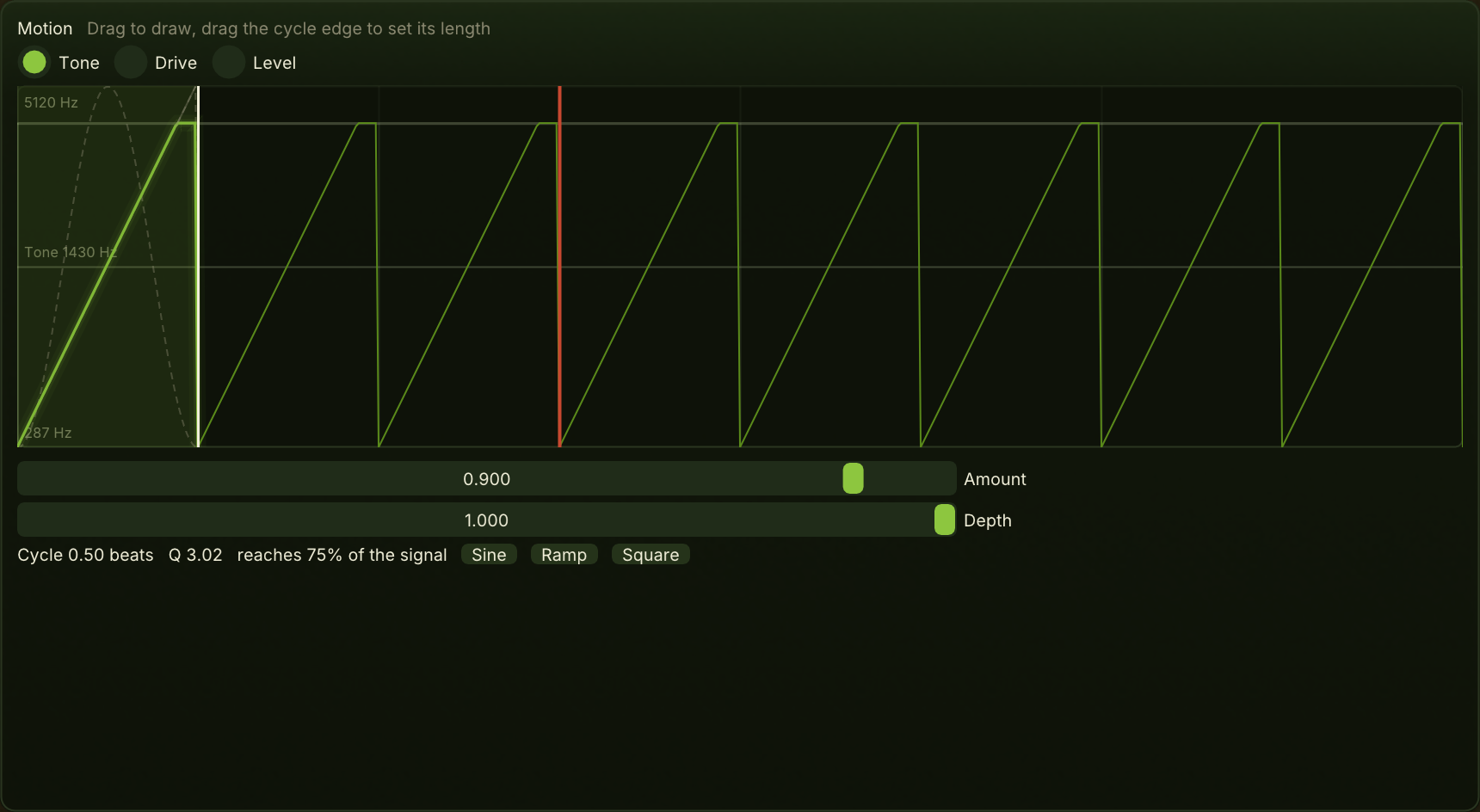
Where the arc moves over bars, Motion moves over beats: a filter sweep, a pumping level, a drive that breathes. Draw one cycle and set its length by dragging its edge; it snaps to lengths that sit on the beat, from a sixteenth up to four bars.

  • Tone sweeps the filter corner and resonates as it goes deeper. Drive closes the drive at the bottom of the cycle. Level ducks the whole voice: a ramp pumps like a sidechain, a square gates
  • Walls show where the filter reaches the end of its range, and the bright trace shows what is played where your drawing is clipped
  • The arc's Motion lane breathes this depth over the phrase, and the canvas shows the depth being played now
  • Sine, Ramp and Square start a lane from a standard shape
The Motion canvas: the Tone lane drawn as a ramp over half a beat, repeated across the view

Each control is a picture you drag

The Voice panel sits under every tab and sets how each note starts, holds, slides and spreads. There are no knobs: each control is a picture of what it does, and you drag the picture.

Punch, Shape, Glide

Punch is a drop in pitch into each note, not a click in level. Shape runs from a pluck that decays to a swell that grows, along one law. Glide sets how long a slide takes, and Legato decides whether an overlap ties or strikes anew.

Render what you hear

The waveform under the canvas renders the current sound playing the current notes over several passes, with heavier lines where each phrase starts over. It shows what the arc does to the audio, which live listening lets you hear only once.

Patches and sessions

A patch is the sound, drawings included, and lives in a shared preset folder that the standalone and the plugin both read. A session keeps the patch and the pattern together. Factory patches cover Sub, Reese, Pluck, Acid and Growl.

Designed in the editor, played in your host

Kiwibass comes as two downloads. The standalone, on Windows, is the editor: every canvas on this page lives there. The plugin is a CLAP instrument for Windows and Linux, with the same engine, so the same patch sounds the same in both.

Patches arrive whole

Your host's CLAP preset browser lists the factory patches and every patch you saved in the standalone, by name and category. Picking one loads the whole sound: every setting, the arc lanes and the motion cycle.

Locked to your transport

The arc and the motion cycle follow the host's transport, so the same bar plays the same way on every playback and a bounce matches what you heard. The project keeps every parameter and every drawing.

What stays in the editor

The plugin has no editor of its own: your host shows its parameters as sliders. The pattern leaves the standalone as a MIDI file. A host that does not list CLAP presets cannot load a saved patch.

Where it sits

Kiwibass is measured against the bass instruments you might buy instead, the synths and effects that draw movement, the bassline writers, and the hosts you already have open.

Against the bass instruments

SubLab XL, Subcraft, Monoment Bass, SubBoomBass 2, Cyclop, LØW, Acid V, Phoscyon 2 and ABL3. None of them draws a phrase across bars or shows the sub against the harmonics measured at the note you play. Monoment Bass has Sub Mono with an adjustable crossover: switched on, the result matches. The difference is that Kiwibass cannot be switched otherwise.

Against movement and visual editing

Serum 2, Vital, ShaperBox 3, Transit 2, Massive X and Pigments. Multi-bar movement is not new: ShaperBox draws curves up to 32 bars, Transit 2 one gesture up to 16, Massive X Performers up to 8. Where they vary a sound from pass to pass, it is at random. Kiwibass makes the phrase the canvas a bass is designed on, with a wander that plays back the same way every time.

Against the bassline writers

EZbass and Logic's Bass Player follow a real drum track, which Kiwibass does not: it writes against the kick row you draw in its own editor. FL Studio's Riff Machine also writes from dice seeds. Captain Deep, Bass Dragon and Riffer round out the set.

Against your host

Ableton Live's Auto Filter puts a filter handle over a live spectrum, and Sting plays from a fixed set of patterns. Neither shows the sub against the harmonics, and neither writes a line from a seed you can share.

Specifications

VoiceMonophonic. A mono sine sub below a 120 Hz crossover, a harmonic layer above it that takes Drive, Tone and Spread
Arc5 lanes (Shape, Tone, Drive, Motion, Spread) across 1 to 16 bars, with Amount, per-lane Depth and Drift
Motion3 lanes (Tone, Drive, Level), one cycle from a sixteenth to four bars
PlayingVelocity moves level, drive, punch and tone together. Note length sets the release. Legato glide on overlapping notes
Pattern4, 8 or 16 bars, genre line presets, 6 scales, seeded generation against a drawn kick, swing and per-note nudge
ExportMIDI (the pattern) and WAV (the current sound playing the current notes)
PatchesShared by standalone and plugin, drawings included. Factory patches in Sub, Reese, Pluck, Acid, Growl and Other
FormatsCLAP plugin for Windows and Linux, no editor of its own. Standalone editor for Windows: plays the demo line or your pattern, no MIDI keyboard input

Get Kiwibass

The standalone editor and the CLAP plugin. Free during early preview. The manual covers every control, and its guides draw a phrase that opens over eight bars and write a line against a four-on-the-floor kick. The buttons fetch the build for your system; other platforms and install notes are on the download page.