Circle of Fifths
The Circle is the second view in the theory panel, the classic two-ring wheel. The outer ring holds the twelve major chords, the inner ring holds each one's relative minor, and the chords in your current key are highlighted. Switch to it with Circle in the panel header.
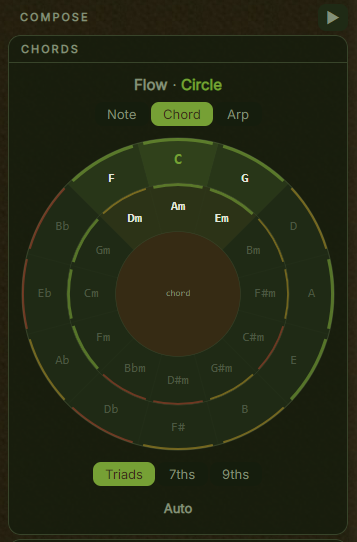
The FlowPad answers "what fits next" with a fixed grid. The Circle answers a different question: how far apart are these chords. Neighbouring segments are a fifth apart, the smoothest step in Western harmony. Once you can see that distance you can read a progression's shape at a glance.
Layout
Both rings run clockwise in circle-of-fifths order, starting from C at the top. The outer ring is the twelve major chords: C, G, D, A, E, B, F#, Db, Ab, Eb, Bb, F. The inner ring is each one's relative minor, sitting directly inside it, so Am is under C, Em under G, Bm under D.
             C
       F  .  Am .  G
    Bb   Dm     Em   D
   Eb                 A
    Ab               E
       Db         B
            F#
Adjacent segments are always a perfect fifth apart, and a major chord shares all but one note with the minor chord inside it. That is the point of the layout: closely related chords sit next to each other, so common progressions trace short paths around the wheel.
Reading the wheel
Every major and minor chord is always shown. The ones in your key are lit and the rest are dimmed, still visible and still pickable.
| Element | Meaning |
|---|---|
| Bright green wedge | The tonic, your home chord |
| Green wedge, outer ring | A major chord in the key |
| Dim neutral wedge, inner ring | A minor chord in the key |
| Dimmed name | A chord outside the key, pickable as a borrowed chord |
| Centre label | The current insert mode, chord or note |
In any major key the lit chords form a tidy block: three majors across the top of the outer ring with their relative minors beneath them. Change key and the block rotates to a new spot. Watching it move is the fastest way to feel how keys relate.
Recommendation arcs
After you place a chord, a coloured arc appears on the outer edge of each segment rating it as a follow-up to what you just played. Green is a common, smooth transition. Amber works and adds variety or colour. Red is unexpected and creates tension.
The ratings come from the same harmony engine the FlowPad uses, so the advice is consistent across both views, and the arcs adapt when a genre profile is active.
Hovering for an explanation
Hovering a segment shows the degree's name and feel, for example "Dominant (V), strong tension, pulls back to I". If you have already placed a chord, the tooltip also explains the transition between them. It is a way to pick up the theory while you work rather than following colours alone.
Inserting chords
The Circle is mouse-driven. Click the outer ring to insert a major chord, the inner ring to insert its relative minor. Clicking a lit chord inserts the diatonic version at your current complexity, so sevenths and ninths are honoured. Clicking a dimmed chord inserts a plain borrowed triad, which is how you reach a chromatic colour outside the key. The arcs then update for the new last chord.
The mode and complexity toggles are shared with the FlowPad, so changing one view changes the other.
Note, Chord, Arp inserts a single root note, the full chord, or an arpeggiated pattern. Triads, 7ths, 9ths sets the chord size: triads are clean and simple, sevenths and ninths add the richness that jazz, R&B and neo-soul lean on.
Keyboard shortcuts
The Circle shares the theory panel's shortcuts. The numpad keys select cells on the FlowPad rather than segments on the ring, so chords here are picked with the mouse. Insert duration, rest, undo and the view toggle all still work. See the keyboard shortcuts for the full list.
Getting the most from it
A path of green arcs around the wheel is a coherent progression, and short hops sound natural because an adjacent segment is a fifth away. Long jumps across the wheel sound bolder, which is sometimes what you want.
In any major key the tonic sits between IV and V on the outer ring. That cluster is the backbone of pop, rock and folk. Dropping inward from any major chord gives its relative minor, which is an easy way to add emotion without leaving the key.
Many people compose on the FlowPad and switch to the Circle when they want to understand a progression they like.