Pattern
The Pattern tab is where a bassline is written: generated from a line preset, drawn by hand, or both. Each bar is a row, written against a kick you draw underneath it.
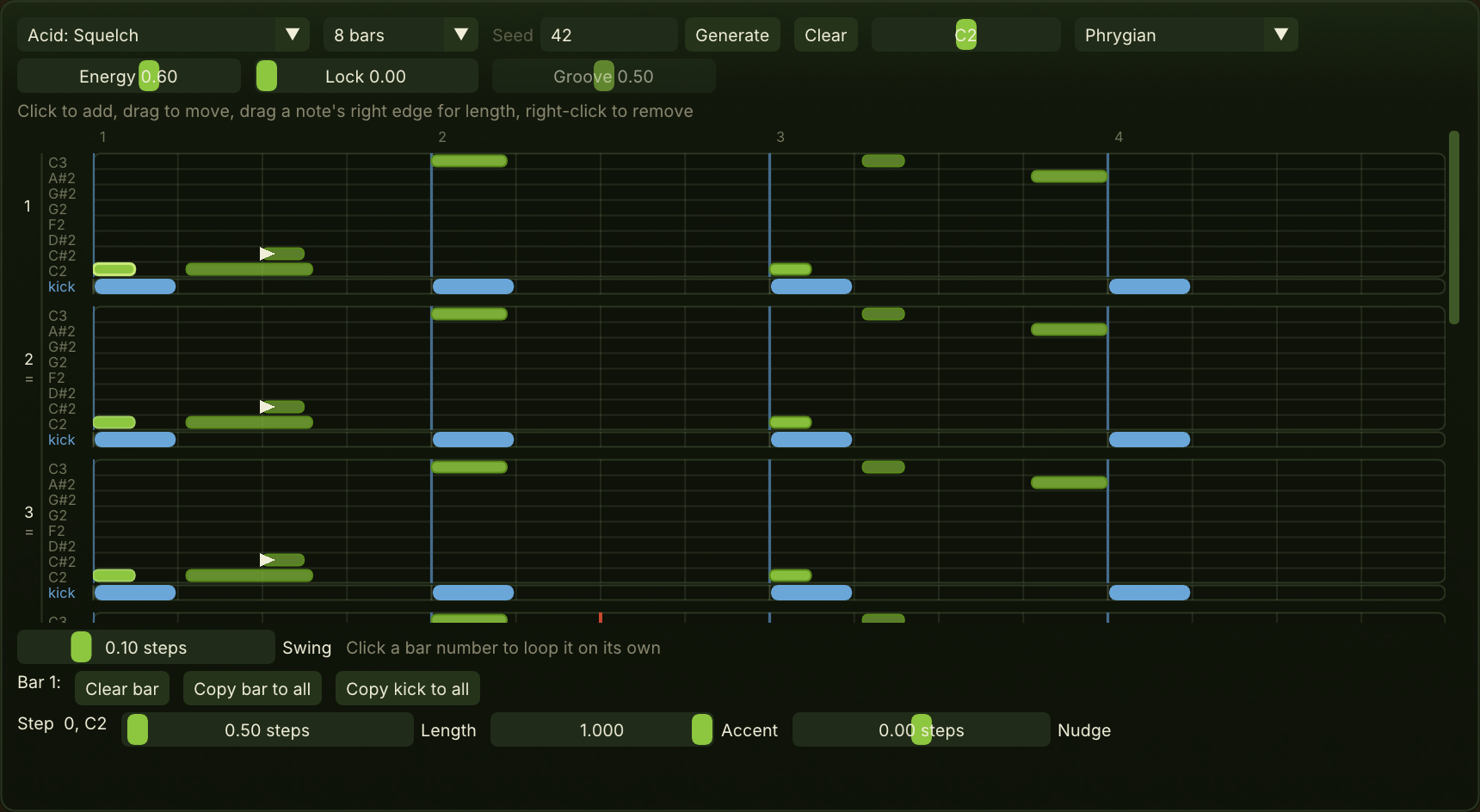
What it does not do yet: the pattern plays in the standalone only, and leaves it as a MIDI file through Export MIDI in the kiwibass menu. The kick row never plays and is not exported. The generator reads the kick you draw; it does not read a drum track.
Writing a line
The line preset picks a genre and a way of playing it: House: Deep, House: Driving, Techno: Rolling, Techno: Minimal, Acid: Squelch, Acid: Busy, Trance: Offbeat roll, DnB: Rolling, DnB: Minimal, Dubstep: Half-time. Picking one writes a new line. A star after the name means a control has moved since.
The length is 4, 8 or 16 bars. Four bars is one group: three the same and a fourth that answers them. Longer, and each group restates the figure changed. Changing the length keeps what is written and adds empty bars after it.
Seed is the number the line is written from. The same seed, with the same preset, settings, key and kick, always writes the same line, so a line can be shared as a number.
Generate writes a new line from the seed, in the pattern's key and against its kick. Clear empties the bass and keeps the key and the kick.
Root is the note every pitch in the pattern is measured from. Scale decides which notes get a lane: Minor, Major, Minor pentatonic, Dorian, Phrygian or Chromatic. Changing it loses nothing already written.
Energy is how much the bass plays: notes added against notes cleared, how far a bar strays from the figure, and how hard the accents hit. Lock is how firmly the line holds to the kick. At zero the kick is reference only. Groove is where the line sits against the kick: on it turned down, on its offbeat turned up. It needs some Lock. Letting go of any of the three writes a new line.
The rows
Each bar is a row of lanes, one per note of the scale, with the note names at the left. A note name in the warning colour is outside the key: its lane is open only because a note sits in it.
- The bar number at the left loops that bar on its own; click it again to loop the whole pattern. The other bars are shaded while one loops.
- An = under the number means the bar plays the same notes as the one above.
- Shaded steps are where the line preset would not put a note against this bar's kick. They are shown, not enforced.
- Kick lines run through the lanes where the kick hits, so you can see what each note answers.
- Notes are solider the harder their accent. The note the generator builds the bar around is outlined brighter.
- An arrow at the start of a note means it glides from the one before: the earlier note runs into it at a different pitch. That overlap is the only way a glide happens.
- The playhead marks the bar and step playing.
Click an empty step to add a note, drag a note to move it, drag its right edge to set its length, and right-click it to remove it.
Under each bar, the kick row: click a step to toggle a kick.
Below the rows
Swing delays the offbeat sixteenths, never so far that a note reaches the one beside it. The text beside it says which bar is looping, if one is.
Bar tools act on the bar last clicked. Clear bar empties it, Copy bar to all repeats its notes in every bar, and Copy kick to all repeats its kick.
The selected note shows its step and pitch, and three settings:
- Length is articulation as much as duration: short notes pluck, long ones sustain, and a note that runs into the next glides instead of striking again.
- Accent is how hard it is played.
- Nudge moves this one note off the grid, within half a step.